Vogue's 120th Anniversary Photo Shoot


0 comments
Vogue, the most influential and most sought after fashion magazine is going to celebrate its 120th year on September and the best way to celebrate its 120th years is to do a massive photo shoot features some of the most influential people like Florence Welch, Rooney Mara and Jennifer Lawrence to name a few. While the list is filled with A-listers in their respective industries it is inspiring (and pressuring) to know that all of them are all under 45 years old! Norman Jean Roy was the man behind the lens in this editorial shoot who is also a top dog in the fashion industry.

Here are some of the photos:

Raf Simons
Sarah Burton, Christopher Bailey & Stella McCartney
Peter Copping & Erdem Moraliogu
Ricardo Tisci & Rooney Mara
Phoebe Philo
Jennifer Lawrence
You can view all the photos with a detailed description about the people in the photo here.

After seeing all the photographs I was naturally psyched to see the BTS video and Vogue was good enough to post one on their Youtube channel.


So what do you think? I'd love to hear what you guys have to say so hit the comment and let's discuss.
(Source: Vogue)
Cheers!

Victoria Secret's Unretouched Photographs


0 comments
This recent set of images of VS Angel Doutzen Kroes that was released by mistake in the Victoria's Secret website for a upcoming September catalog has rekindled the age old discussion of real beauty and heavy photo retouching. In my opinion these images are good to go and to be honest its refreshing to see raw commercial photographs of women and most specially the models of Victoria's Secret in a raw and unedited photograph.


Maybe I'm just lazy or this photographs are really good to go after tweaking the exposure on the skin just a bit and cloning away some of the blemishes. What do you guys think? I'd love to hear what you have in mind so bring those comments in. 

(Sources: FstoppersJezebel)


Photography Inspiration: Patrick Demarchelier


0 comments
I have been following Patrick Demarchelier's work since I first saw his photographs in a back issue of Vogue July 2011. I really love his work because the his images are always stunning and clean to the very last detail. After doing my bit of research I was awed to learn that he was able to worked with the great Henri Cartier-Bresson as well as Terry Gilbert while he was building up his career. With a client list that comprises some of the biggest names in the fashion industry, Patrick Demarchelier is one hell of a fashion photographer


Simon Bruty & Martin Schoeller Photographs the Olympic Hopefuls


1 comments
Its Olympic season again and people from across the globe are glued to whatever device they can get a hold onto to get updates from the 2012 London Olympics. Some are lucky (most Londoners are) to be able to watch and see the action in the flesh as they cheer for their countrymen to succeed. Press photographers are lucky as well apart from going to London while totting a humble lens to a behemoth 500mm clicking away, capturing the scenes of the Olympics they also are the first to see the and capture the passion and determination of the participants. Whilst ordinary photographers like me are still dreaming of photographing the different sporting events at London.

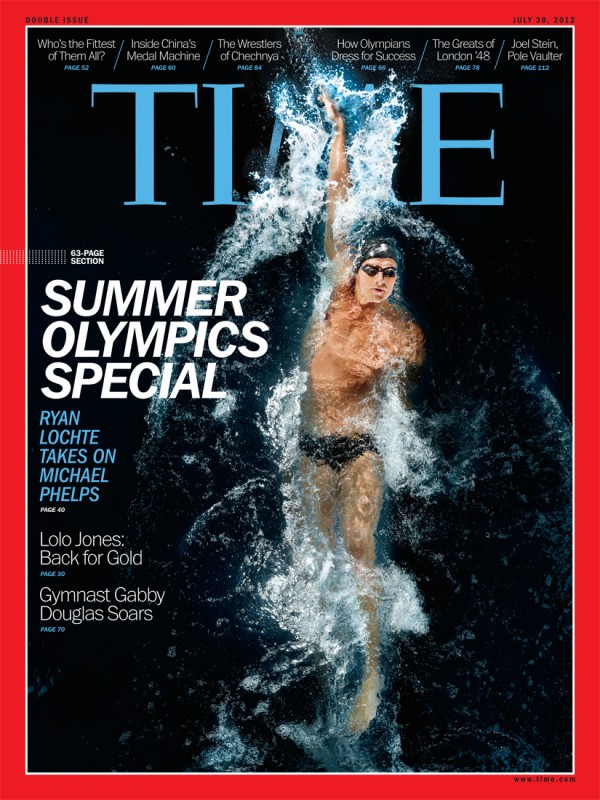
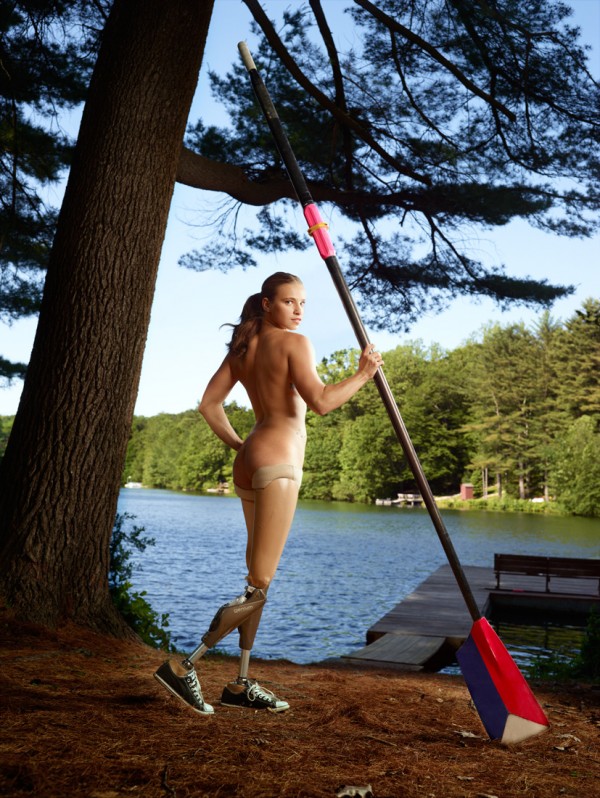
In line of the Olympics I found some really interesting, if not outstanding editorial photographs of the hopeful athletes competing for the gold. First off is Martin Schoeller's shoot for Time Magazine, ESPN Magazine and Women's Health.

Gabby Douglas on the cover of Time Magazine

Ryan Lochte on the cover of Time Magazine

Lolo Jones for Time Magazine

Oksana Masters for ESPN Magazine

Allyson Felix
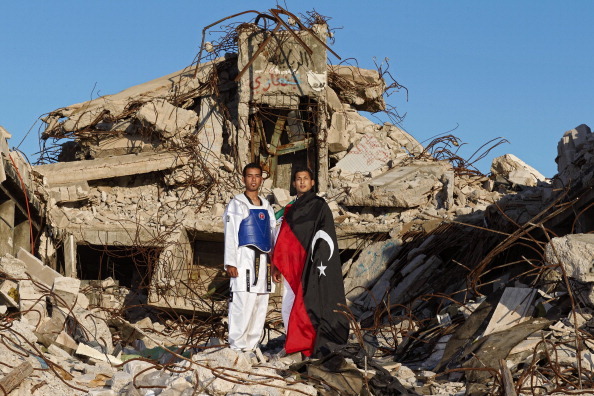
Another photogorapher who did a stunning set is Simon Bruty who photographed such superb images for Getty Images and Sports Illustrated. From Tunisia to Yemen Simon Burty photographed these athletes despite the of what is currently happening to their countries. I learned about this beautiful set while watching CNN's The Brief with Jimmy Clancy just this morning and I was really glad that I caught it because it was really inspiring not only to the athletes but also to us photographers who are striving hard to produce such beautiful images.


(Sources & Credits: spd.org | Getty Images | Trendland)

Give your photos that Lo-fi look with Adjustment Layers


5 comments
Ever since the rise of Lomography (lomo for short) and Instagram, the people's love for photography has gone through the roof. Back then, people are strapped with toy cameras clicking happily while finishing a roll of expired film. Images produced by these nifty toy cameras loaded with expired film are often over exposed, vivid, lo-fi and dreamy which made the photo more interesting.

A sample of a photograph a lomo camera produces.
Fast forward to 2010 the phenomenal app Instagram was launched. People got hooked with it, because not only you are able to share images in the internet with your iPhone (recently available for Android) and gain followers you are also able to customize your photograph through the use of filters. The effect is somewhat similar to a Polaroid and Kodak's Instamatic. This makes your ordinary vignettes of mundane objects look cool and interesting.

A Instagram image
Photographers too has adopted the use of creative filters to give their photographs more oomph. They do this in Adobe Photoshop. While there are heaps of plugins and actions that will instantly give your photograph that lo-fi look, the problem is the limited pool of choices you can make and more often than not the look that you desire is not in there.

If you are already familiar with cross-processing then this is piece of cake for you. Now for those of you who are new or just have heard the term cross-processing for the first time then you better check this out. Our primary tool in this tutorial is the Adjustment layers which is available in CS3 to CS6 so no matter what version you are using you'll be able to follow the steps that I'm going to share to you.

Here's the before and after of the image. Alright let's do this!


1. Let's start off with a unprocessed jpeg photo in RGB format.


2. Next we duplicate the layers, CTRL+J for Windows and Command+J for Mac. This is just to make sure that we will not make any changes to the original layer despite using adjustment layers.


3. Now the magic begins. Go to adjustment layers, If you don't see it just go to Windows > Adjustments. Good? Alright, now click Exposure (encircled in red) 


3.1. Now we are going tweak the Exposure layer. Since most lo-fi effects have a bit of that washed up look we'll tweak the Offset just a little bit. This will give the photo a slightly washed up look.


4. Next, click Curves in the adjustment layer.


4.1. While in Curves we have to select the individual color channels and tweak it there. For now we will not dabble with formulas in adjusting the curves. This is purely up to you on how you want your final image to be.


4.2. Now go to the red channel. Just to be safe what you can do first is make a bit of an "S" curve either a inverted "S" or a regular "S" it is up to you so experiment. In my case I want the reds in the image to be a bit reddish and leaning a bit towards purple. So this is what I did:
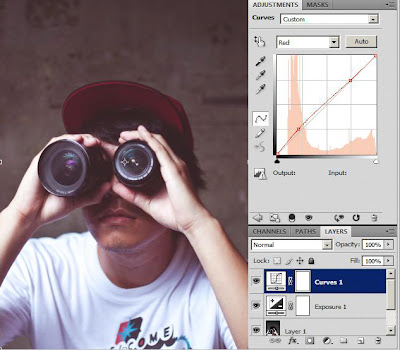
Not much of an S shape eh :)
4.3. Next up is the green channel. Same thing but instead of doing an S shape I did more of a lump. Now you'll notice that after you tweak the curves in the green channel the color of the whole image change from purple-ish to a dull greenish tint. 


This is because all the information in color channels are stacked together I'll explain further next time since this topic requires more research.

4.4. Lastly we'll go for the blue channel same principle just tweak the curves till you get what you wanted. Here's mine:


I did a inverted S for this one to bring back some of the purple tint and lessen the yellow a bit.

5. Before we finish this tutorial I wanted to bring back some of the lost contrast so I've decided to use levels you can do this either pressing CTRL+L (Windows)/Command+L (Mac) or just use the levels in Adjustment layers which I prefer since you can go back to levels again and again without ruining the image.


Save to jpeg and you are done!

So there you go! With the help of adjustment layers you can turn any ordinary looking photographs to cool lo-fi photos.

Cheers!


newer post older post